
AMA Online
A unified professional interface for navigating complex construction standards across devices
AMA Online | Product Experience Deep Dive
Redesigning navigation, search, and dense standards content into predictable daily workflows
I improved how construction professionals find, interpret, and apply AMA standards by restructuring wayfinding, building an accessible design system, and validating interaction patterns through testing and behavioral data
Client
Svensk Byggtjänst I BTB SaaS
Scope
Inside the product (post-onboarding)
Focus areas
Navigation, search, information architecture, content UX, design system, accessibility
Context
AMA Online is a professional knowledge tool with dense, rule-based content used in real projects under time pressure. Even experienced users struggled to:
-
know where to start
-
find the right section confidently
-
understand “what applies” to their case
-
work efficiently over time without support or training
The product had grown over years with fragmented patterns, inconsistent terminology, and legacy UI decisions, creating high cognitive load and low trust in the interface.


Legacy AMA Online interface with fragmented navigation, dense content, and inconsistent interaction patterns.
The problem
The core product problem was not lack of content, it was lack of guidance and structure.
Users didn’t primarily fail because they couldn’t search. They failed because the system didn’t provide:
-
predictable paths to the right content
-
clear ownership of what they had access to
-
consistent reading patterns for complex material
-
a stable interface language across areas and devices
This increased reliance on customer support and contributed to slower adoption of the digital product compared to printed manuals.


Legacy AMA Online view where users were expected to know where to start and how to interpret results without guidance.
Goals & Success Criteria
Product goals
-
Reduce cognitive load and increase confidence in navigation and search
-
Make “first steps” obvious for both new and returning users
-
Improve readability and scannability of standards content
-
Create a scalable UI foundation (design system) to support future development
-
Ensure accessibility is built-in (WCAG 2.1 AA)
Success signals
-
Higher task success in usability testing
-
Faster time-to-content for common workflows
-
Fewer support tickets tied to access, navigation, terminology
-
Behavioral confirmation in analytics/Hotjar (improved flow through core paths)
My Role
Senior Product & Service Designer — responsible for product UX strategy and execution for the AMA Online interface.
I led:
-
UX audit of legacy interface and navigation
-
user research synthesis into workflow-based needs
-
information architecture direction and validation
-
design system creation (components + rules + accessibility)
-
interaction design for search, navigation, and reading patterns
-
alignment across product, editorial, marketing, and development
-
internal validation (tests + walkthroughs) and design QA
Approach
Step 1 — Diagnose the UX debt
I started by mapping friction across the daily product experience:
-
where users got lost
-
what labels confused them
-
where navigation broke expected mental models
-
where dense content created scanning failure
Output: a prioritized problem set tied to user workflows and support patterns.
Step 2 — Ground the structure in workflows
Research synthesis showed that success correlated more with workflow maturity than role name.
I reframed key audiences into behavior-based groups (e.g., beginners vs. power users), which clarified where the greatest impact would be: first-time clarity + repeat-use efficiency.
Constraints
-
Complex, legally sensitive content with strict editorial rules
-
Legacy technical structure and multiple product areas
-
Mixed user maturity (beginners + experts)
-
Required accessibility compliance (WCAG 2.1 AA)
-
Needed consistency between product, marketing surfaces, and printed AMA logic


Mapping UX debt across workflows through audits, workshops, and expert walkthroughs and reframing the information architecture around workflow maturity rather than user roles.
Step 3 — Rebuild wayfinding + entry points
I redesigned how users orient and start:
-
clear entry into the right “area” (so users don’t guess)
-
predictable navigation model across sections
-
reduced ambiguity in labels and content grouping
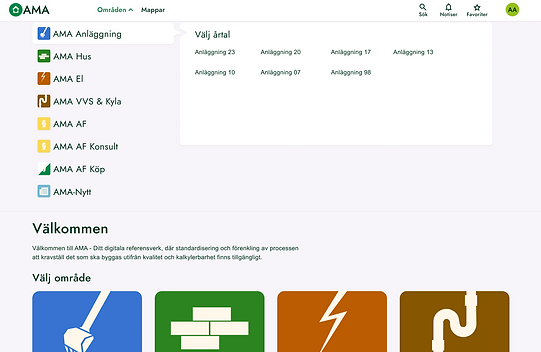


Clear entry points and predictable navigation models reduced guesswork and improved first-time confidence.
Step 4 — Make search predictable (and results usable)
Search isn’t valuable if results can’t be interpreted.
I focused on:
-
meaningful filters and content type structure
-
scannable results that support fast decisions
-
consistent patterns for moving from search to reading to applying
Step 5 — Design for reading (content UX)
Standards content is not “read like an article.”
I introduced stable reading patterns:
-
hierarchy and typography inspired by AMA books
-
clear structure for dense, rule-based material
-
consistent UI logic for definitions, references, and sections


Search redesigned to support interpretation, filtering, and confident decision-making and reading patterns and typographic hierarchy designed for dense, rule-based professional content.
Step 6 — Build the design system as governance
To stop fragmentation, I created a scalable design system:
-
grids, buttons, forms, navigation patterns
-
component logic for dense layouts and content blocks
-
terminology and UX writing rules
-
accessibility baked into tokens and components (WCAG 2.1 AA)
Step 7 — Validate and iterate
I validated direction through:
-
internal walkthroughs with experts and customer support
-
usability testing (task success + confidence)
-
behavioral confirmation
-
structured design QA across product areas (reducing inconsistencies)

A scalable design system built as governance, ensuring consistency, accessibility, and long-term maintainability and
validation through usability testing, expert walkthroughs, and behavioral confirmation.
Key Solutions
Clear structure for dense professional workflows
I introduced a more consistent interaction model across areas so users could learn the interface once and reuse it everywhere.
Search + navigation that work together
Instead of treating search as “the solution,” I ensured navigation, filters, labels, and results presentation jointly support decision-making.
Content readability built for scanning under pressure
I designed hierarchy and content patterns that support:
-
quick scanning
-
safe interpretation
-
reduced misreading risk
This is where the “professional tool” credibility is won.
Accessibility as a foundation, not a layer
-
Accessibility was designed into:
-
typography and contrast decisions
-
interaction patterns
-
predictable structure
-
component rules (not manual fixes)
Outcomes
This work resulted in a more cohesive, accessible, and professional product experience that:
-
improved clarity and confidence in daily use
-
reduced dependency on support for wayfinding and interpretation
-
increased activation and adoption by making the product easier to start using and easier to return to
-
created a scalable UI foundation for future development inside AMA Online
It also created a platform foundation that later enabled exploration of guided and AI-assisted workflows.
Reflection & Learnings
AMA Online was one of the most complex and strategically critical products I’ve worked on, balancing strict content constraints, legacy systems, and real-world professional decision-making.
Key learnings:
Instead of treating search as “the solution,” I ensured navigation, filters, labels, and results presentation jointly support decision-making.
-
Structure creates trust. In complex domains, users don’t trust “features”, they trust predictable structure, consistent terminology, and stable patterns.
-
Design systems are change management. A design system isn’t UI polish; it’s governance that prevents fragmentation and aligns teams over time.
-
Workflow-first beats role-first. Segmenting users by workflow maturity clarified priorities and prevented designing for job titles rather than real behaviors.
-
Accessibility improves everyone’s speed. When reading and navigation are designed for clarity under constraints, all users benefit, not only those with impairments.
-
Alignment is a deliverable. Recording walkthroughs, making rationale visible, and tying decisions to outcomes created momentum and reduced resistance across silos.

